
ChatGPT can now help you create and edit PowerPoint presentations, here is how
OpenAI has launched a new PowerPoint integration that allows users to turn notes, documents and ideas into editable slide decks. The integration helps users create, refine and customise presentations without leaving Microsoft PowerPoint.
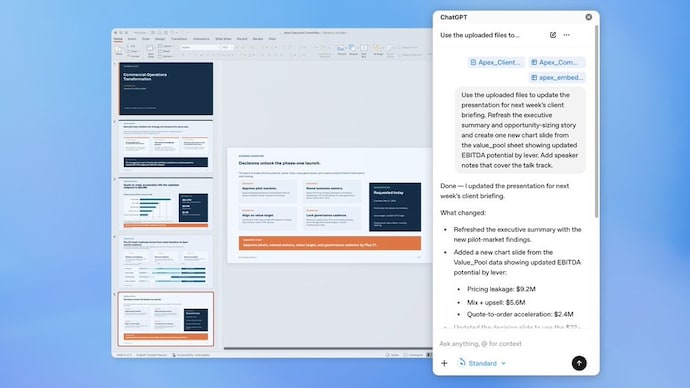

You can now create an entire PowerPoint presentation just by chatting with ChatGPT. OpenAI has launched a new ChatGPT integration for Microsoft PowerPoint that allows users to create, edit and refine slides directly inside the presentation app. And you do not need any special design or presentation skills. You can create an entire slideshow using simple natural-language instructions.
The new feature, currently available in beta, adds a ChatGPT sidebar to Microsoft PowerPoint. Once installed, you can ask the chatbot to build slides from scratch, turn notes into presentation-ready decks, update existing presentations or even rewrite sections of a slide deck without leaving PowerPoint.
How ChatGPT for PowerPoint works
According to OpenAI, the tool is designed to help users go from rough ideas to polished presentations in minutes. Instead of manually creating slides one by one, users can upload notes, documents, spreadsheets, images or existing presentations and ask ChatGPT to transform that material into a structured deck. The chatbot can also generate new slides, reorganise content, add sections and improve the overall flow of a presentation.
For example, you can upload meeting notes and key performance indicators and ask ChatGPT to create a 10-slide board presentation complete with an executive summary, a risks section and clear next steps. The chatbot will then generate the content while keeping the slides editable within PowerPoint, which will allow you review and make changes before sharing the presentation.
The integration is also said to go beyond simply drafting slides. You can ask ChatGPT to review a presentation, identify gaps in the narrative, highlight missing information and even suggest questions an executive audience might ask. The company says this can help users improve storytelling, simplify complex information and make presentations more effective.
The feature also supports a range of editing tasks. You can ask ChatGPT to rewrite content, tighten the structure of selected slides, reduce unnecessary text, clarify key takeaways or add visual elements such as chart slides generated from tables. Another example shared by OpenAI shows users turning screenshots into editable PowerPoint slides, making it easier to reuse content without manually recreating it.
For businesses, the tool could be useful for tailoring presentations to specific clients. OpenAI says users can upload account notes and usage data, then ask ChatGPT to customise a quarterly business review deck for a particular customer. Similarly, research notes can be converted into client-ready recommendation presentations using existing company templates.
ChatGPT for PowerPoint rollout
The beta rollout is available globally across a wide range of ChatGPT plans. These include ChatGPT Business, Enterprise, Edu, Teachers and K-12 subscriptions, as well as Free, Go, Plus and Pro users. This broad availability means most ChatGPT users will be able to access the feature once it reaches their account.
How to create PowerPoint presentations in ChatGPT
Getting started is simple. You can install the ChatGPT for PowerPoint add-in through PowerPoint's Add-ins section or via the Microsoft Marketplace. Once you sign in with your OpenAI account, ChatGPT appears in a sidebar inside PowerPoint, where it can work with uploaded files and presentation content directly within the app.
The ability to create presentations within ChatGPT builds on OpenAI's growing productivity integrations. Earlier, the company introduced ChatGPT tools for Excel and Google Sheets, allowing users to create spreadsheets, edit formulas and analyse data using prompts. With the PowerPoint integration, OpenAI is extending the same AI-powered workflow to presentations, aiming to make slide creation faster and significantly less time-consuming for users.