
Google brings Gemini Omni video editor to India, lets users edit clips with text prompts
Google has brought Gemini Omni, its new AI video creation and editing model, to India, allowing users to upload clips and edit them with text prompts through the Gemini app and on website.
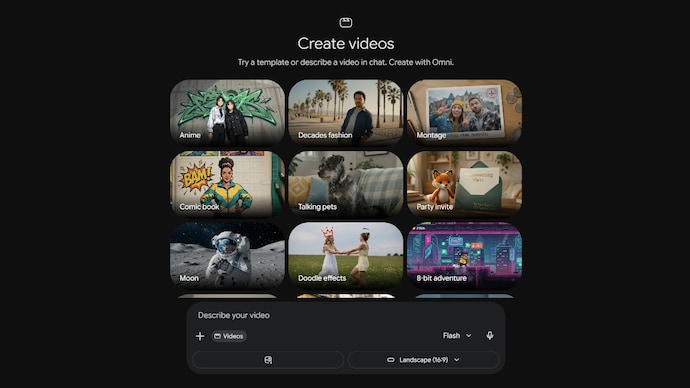

You can now edit your videos just by describing the changes you want to Gemini AI. Google is expanding the reach of its latest AI-powered video creation and editing tool, Gemini Omni, to India. Google first introduced Gemini Omni at its I/O developer conference earlier this year. The model combines Gemini's reasoning capabilities with content creation tools, allowing users to generate and edit videos using natural language prompts.
In a post on X, Google announced that users in India can now upload videos directly to Gemini Omni and edit them using simple text prompts. The feature is rolling out through the Gemini app and Gemini's web platform. Gemini Omni is Google's flagship multimodal AI model that can understand and generate content across text, images, audio and video.
What exactly is Gemini Omni?
At its core, Gemini Omni is Google's new multimodal AI model family that combines Gemini's reasoning capabilities with content creation tools. In simple terms, it can understand and work across different types of content, including text, images, audio and video.
For now, Google is focusing on video. The first model in the lineup, Gemini Omni Flash, is rolling out across the Gemini app, Google Flow and YouTube Shorts. The company has also said it plans to bring the technology to developers and businesses through APIs in the coming weeks.
Google describes Omni as a system that can "create anything from any input." What that means for users is that they can combine text prompts with images, videos and even voice references to generate entirely new video content or edit existing clips. Instead of relying on a single prompt, the model can use multiple forms of input to better understand what the user is trying to create.
How does Gemini Omni work?
To use Gemini Omni, open the Gemini app or head to gemini.google.com and upload a video clip you want to edit. Once uploaded, simply describe the changes you would like to make using a text prompt. You can ask Gemini to add visual effects, change the style of a scene, modify objects, or give the entire video a different look.
Notably, you don't have to get everything right in a single prompt. Gemini Omni supports what Google calls "conversational editing," allowing users to refine a video through follow-up instructions, much like chatting with an AI assistant.
Google says the model also remembers previous edits and builds on them over multiple prompts while maintaining consistency in the scene, characters and objects. This means users can gradually tweak a video until they get the result they're looking for, without having to start from scratch each time.
The company has also introduced a feature called Avatars, which allows users to create videos featuring a digital version of themselves using their own voice.
There are some limits for now
Like most new AI tools, Gemini Omni comes with a few limitations. For now, the model can generate video clips of up to 10 seconds with audio, although Google has said it is working on extending that limit in the future.
To help identify AI-generated content, every video created using Gemini Omni includes Google's SynthID digital watermark. Users can also verify whether a video was generated with AI through Gemini, Gemini in Chrome and Google Search.
Gemini Omni availability
As for availability, Google says Gemini Omni Flash is rolling out globally including India to Google AI Plus, Pro and Ultra subscribers through the Gemini app and Google Flow. The company is also bringing the technology to YouTube Shorts and the YouTube Create app, making the video-generation model accessible to a broader audience.